A Fiber Optic Distribution Cabinet may look like a metal enclosure beside a road, but its choices shape network reliability for years. Inside, splitters, adapters, splice trays, and cable slack must fit neatly and remain accessible. A poor match can mean crowded trays, difficult maintenance, or limited room for future connections.
The need for sound planning is growing. The ITU’s Facts and Figures 2024 estimated that 5.5 billion people were online, about 68% of the world’s population. The FTTH Council Europe’s 2024 Market Panorama also tracked continued expansion of fiber-to-the-home networks across Europe. These figures describe network growth, not cabinet demand directly. Still, they show why capacity and upgrade paths deserve attention.
Gary Bolton, president and CEO of the Fiber Broadband Association, has advocated for fiber as long-term infrastructure; this is a paraphrase, not a verbatim quotation. The practical lesson is simple: plan beyond today’s port count. Yet no cabinet suits every site. Pole-mounted cabinets face different space and weather constraints than street-level units. This guide outlines seven checks: capacity, environment, cable management, access, protection, compatibility, and lifecycle cost. Look closely at the details. A tidy splice tray matters. So does room for the next cable. Choosing well takes more than comparing a product sheet—and real projects may expose trade-offs that specifications miss.
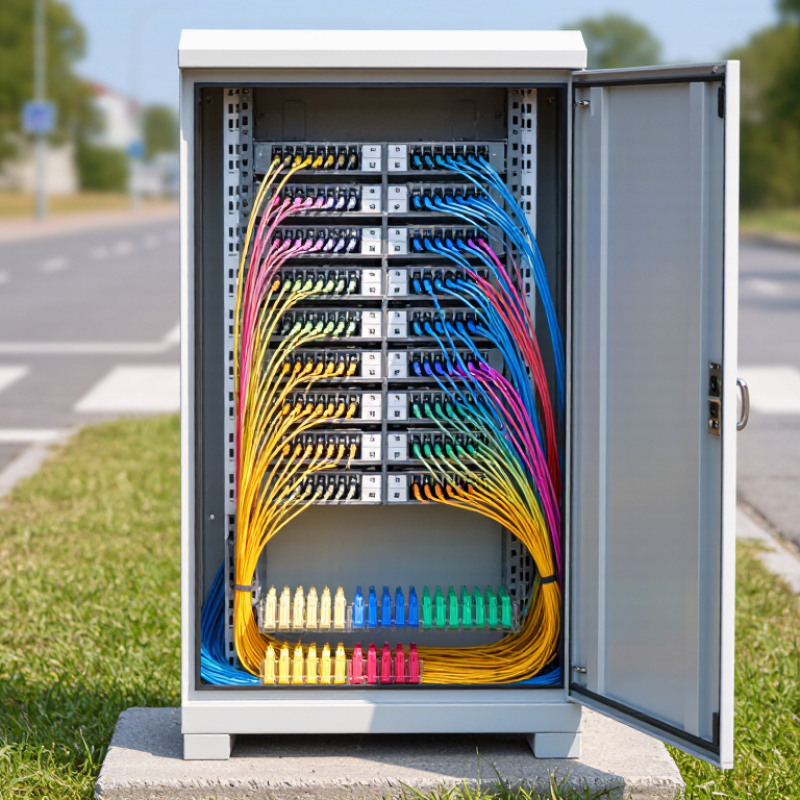
A fiber optic distribution cabinet is the organized handoff point between feeder cables and the smaller distribution lines serving homes or businesses. Inside, technicians route fibers, manage splices, and install splitters that divide optical signals. The enclosure also shields connections from dust, moisture, accidental strain, and repeated maintenance. It is more than a box. Poor routing can create tight bends, confusing labels, or difficult repairs, even when the network works today.
The scale of connectivity makes dependable distribution important. The ITU’s Facts and Figures 2023 estimated that 5.4 billion people used the internet, while 2.6 billion remained offline. That figure describes global access, not cabinet performance, but it shows why practical network infrastructure matters. In the field, a technician may need to identify one drop cable among many, sometimes in poor light. Clear labeling and accessible trays save time.
Tips: Check capacity for current and planned fibers. Match the enclosure’s protection rating to indoor or outdoor exposure. Confirm splitter and splice-tray compatibility. Look for secure cable entry and bend-radius control. Leave room for future growth. Choose labels that remain readable. Test that technicians can open, inspect, and reseal the cabinet easily. A tidy cabinet is not automatically a maintainable one; that distinction is easy to overlook.
| Tip | What to Evaluate | Why It Matters | Practical Check |
|---|---|---|---|
| 1. Match the cabinet to its location | Confirm whether installation is indoors, outdoors, in a street cabinet, or in a controlled equipment room. For outdoor use, consider rain, dust, temperature, sunlight, and the specified enclosure protection rating. | The environment affects enclosure construction, sealing, ventilation, and the protection needed for connectors and splices. | Compare the product’s stated operating conditions and protection rating with the actual site conditions; do not assume every outdoor cabinet has the same protection level. |
| 2. Plan for fiber capacity and growth | Estimate current and planned fiber counts, connector ports, incoming and outgoing cables, and any spare capacity needed for future connections. | A cabinet that is too small can make routing and maintenance difficult, while unused capacity may increase cost and occupy unnecessary space. | Check the usable splice and adapter capacity, not just the cabinet’s external dimensions. Confirm that expansion can be made without violating bend-radius requirements. |
| 3. Choose the right splice and termination layout | Identify whether fibers will be spliced, connectorized, or managed using both methods. Check tray, cassette, adapter-panel, and cable-management arrangements. | A layout suited to the network makes fiber identification, testing, repairs, and additions more manageable. | Verify that trays and panels are accessible and that slack storage keeps fibers organized without sharp bends or excessive tension. |
| 4. Check cable entry and routing space | Review cable entry direction, port sizes, gland or seal arrangements, cable diameter range, and space for routing and strain relief. | Poorly matched entries can complicate installation, compromise sealing, or place mechanical stress on fibers. | Compare entry dimensions with the actual cables and installation method. Confirm that unused openings can be sealed appropriately. |
| 5. Consider materials and corrosion protection | Assess enclosure material, finish, hardware, and exposure to moisture, salt, pollutants, or temperature changes. | Material and finish influence durability and maintenance needs, especially in exposed or corrosive environments. | Review the manufacturer’s material and environmental documentation, and check whether installation conditions require additional corrosion protection. |
| 6. Make access and maintenance practical | Consider door or panel access, working clearance, lock options, labeling space, and how technicians will inspect or test connections. | Good access helps reduce the risk of disturbing neighboring fibers during routine work and fault isolation. | Check that the cabinet can be opened safely at the chosen site and that ports, trays, and cable identifiers remain easy to reach and read. |
| 7. Verify mounting, security, and compliance needs | Confirm wall, pole, floor, or pad mounting requirements; enclosure dimensions and weight; grounding or bonding provisions where applicable; and project or local requirements. | Correct mounting and site-specific safety measures help ensure a stable installation and support applicable network and electrical practices. | Review installation drawings, mounting hardware, access-control needs, and relevant local codes or project specifications before ordering. |
Selection note: Confirm cabinet capacity, environmental ratings, cable compatibility, and installation requirements against the project design and site conditions.
Match it to the network’s existing fiber, such as single-mode OS2, multimode, or both. Check adapter types and splice-tray capacity.
Tight bends behind crowded trays can increase signal loss and make repairs harder. Small details matter.
No. It indicates dust protection and resistance to water jets, but does not cover every hazard. Check seals, drainage, corrosion, and UV exposure separately.
Check site temperatures, humidity, and direct sunlight. Sealed cabinets may limit dust but trap heat. Not enough.
Confirm that entry points stay sealed after cables are added or replaced. Field changes can be easy to underestimate.
Request test documents, clear port maps, compatible splice trays, and replacement-part lead times. Ask how quickly support responds.
Include installation labor, grounding, accessories, maintenance visits, and expected expansion. Compare the same configuration and note exclusions.
Extra room can help with expansion, but an oversized cabinet may waste space and complicate installation. I would still leave some room for judgment.
Choosing the right Fiber Optic Distribution Cabinet helps protect network connections and keep fiber infrastructure organized, accessible, and dependable. Start by understanding the cabinet’s role in distributing and managing fiber connections, then select a capacity that meets current requirements while leaving room for expected network growth. Check that the cabinet supports the fiber types and connection components your system uses, and compare its protection and environmental ratings with the conditions where it will be installed.
Also consider practical details that affect long-term use. A suitable cabinet should be straightforward to install, provide effective cable routing and strain relief, and allow technicians to inspect, maintain, or expand connections without unnecessary disruption. Finally, review applicable standards, the availability of supplier guidance and support, and the total cost over the cabinet’s service life. Weighing these factors together can help you choose a solution that fits your network’s needs and remains manageable as they evolve.

 KOCENT OPTEC