Fiber Cabinets have become critical infrastructure as broadband networks move deeper into homes, businesses, and public spaces. The OECD Broadband Statistics report shows that fiber represented about 42% of fixed broadband subscriptions across OECD economies in 2023. That share continues to rise. Demand is real.
The Fiber Broadband Association’s 2024 North American Market Report also describes sustained fiber deployment, driven by cloud services, remote work, artificial intelligence, and higher capacity requirements. Meanwhile, the FTTH Council Global Alliance tracks expanding fiber-to-the-home coverage across mature and emerging markets. These figures reveal a practical issue: network growth depends on more than cable length. It depends on protection, access, density, thermal control, and installation discipline.
Gary Bolton, President and CEO of the Fiber Broadband Association, has stated, “Fiber is the future of broadband.” His point matters when selecting Fiber Cabinets. A cabinet may sit quietly beside a road, yet it protects expensive connections from moisture, dust, heat, accidental impact, and repeated maintenance visits. Small details matter.
This guide presents 10 Fiber Cabinets buying tips for global buyers. It examines capacity, ingress protection, materials, cooling, splice management, security, standards, supplier capability, delivery, and lifecycle cost. A lower purchase price can look attractive. It may become expensive later.
There is no perfect cabinet. Local climate, network architecture, technician habits, and expansion plans can change the decision. Some recommendations will need adjustment. That is the uncomfortable part. Reliable procurement requires evidence, site experience, and honest review of what might fail.
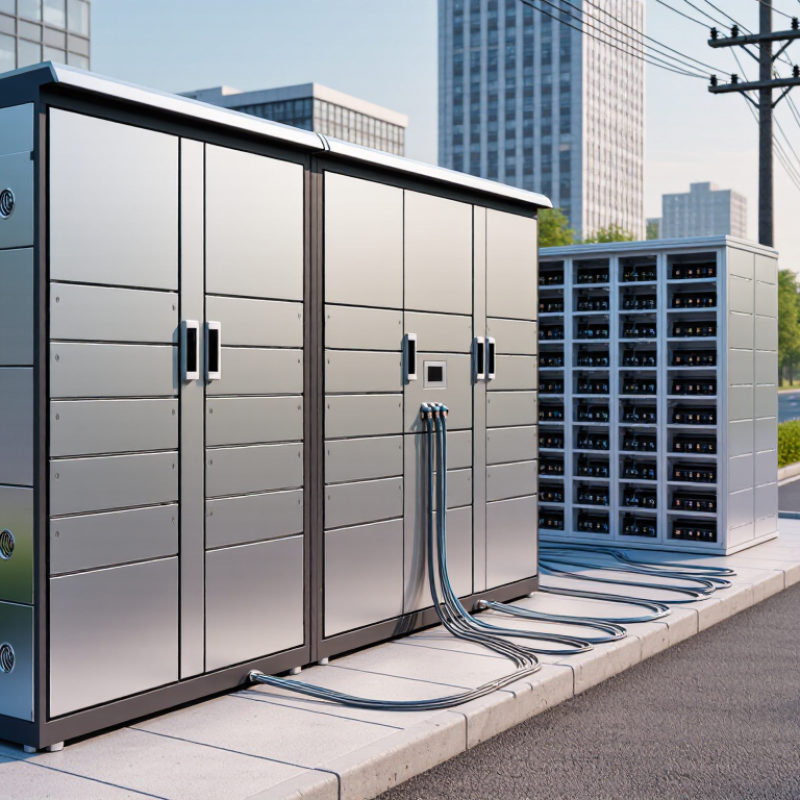
Define Fiber Cabinet Types and Their Intended Applications
Choosing a fiber cabinet starts with identifying its type and intended application. Wall-mounted cabinets suit offices, security rooms, and small distribution points. They save floor space and support limited patching capacity. Floor-standing cabinets fit data centers, telecom rooms, and campus networks. They provide more rack units, deeper cable routes, and room for splice trays. Space matters.
Outdoor fiber cabinets require weather resistance, controlled ventilation, and secure cable entry. Their enclosure should match local exposure, dust levels, and temperature changes. A high ingress protection rating helps, but it does not replace proper drainage or maintenance. For dense backbone links, modular optical distribution cabinets simplify fiber termination, splicing, and future expansion. Field technicians can trace connections more easily when adapters and trays are clearly labeled.
Application needs should guide cabinet dimensions, not appearance. Check fiber count, connector type, bend-radius limits, power requirements, and access direction. A cabinet near a building entrance may need stronger locks and reinforced mounting. A data center cabinet may prioritize front access and high-density patch panels. I have seen teams choose oversized cabinets “for safety,” then waste usable room and budget. That choice is not always wrong, but the reason should be documented. Measure twice. Leave practical slack for growth, cleaning, and emergency repairs. A neat layout today can become difficult after one careless upgrade.
Assess Capacity, Density, and Future Expansion Requirements
A fiber cabinet should be sized for tomorrow’s traffic, not only today’s patching list. The International Telecommunication Union’s Facts and Figures 2023 report counted 5.4 billion internet users, equal to 67% of the global population. This growing demand makes spare capacity a practical requirement. Count incoming fibers, active ports, splice trays, splitters, and power modules before selecting a cabinet.
Leave room for change.
A useful planning method is to reserve 25–30% of rack space, cable pathways, and fiber ports for expansion. This is not a universal rule, but it gives technicians space to work without disturbing live connections. High-density cabinets can reduce floor space, yet tightly packed adapters may increase bend-risk and make fault isolation slower. Check the minimum bend radius, tray depth, connector access, and airflow path. A cabinet that looks efficient on paper may become difficult after several installation cycles.
Future capacity also depends on the site. The International Energy Agency’s Electricity 2024 report estimates that data-center electricity consumption could rise from about 460 TWh in 2022 to between 620 and 1,050 TWh by 2026. More equipment may bring greater cooling and power demands. Consider overhead loading, grounding, ventilation, and modular expansion points. I have seen projects overestimate port density and underestimate technician access. That mistake is expensive, but avoidable. Recheck actual cable routes with a full-scale layout before purchasing.
10 Fiber Cabinets Buying Tips for Global Buyers: Assess Capacity, Density, and Future Expansion Requirements
The chart compares typical fiber-port planning capacity for 12U, 24U, and 42U cabinets. The recommended approach is to deploy only about two-thirds of the available capacity initially and reserve approximately one-third for future expansion, moves, adds, and changes. Actual capacity varies by adapter type, splice-tray configuration, cable management, and connector density.
Compare Materials, Protection Ratings, and Environmental Durability
Global buyers should compare cabinet materials before comparing prices.
Powder-coated steel offers rigidity and practical impact resistance. Aluminum reduces weight and resists corrosion in humid coastal sites. Polycarbonate suits nonconductive installations, but cheaper grades may weaken under repeated sunlight.
Check sheet thickness, hinges, locks, and mounting points.
Thin panels may flex during cable installation. That matters later.
Protection ratings need careful reading, not casual marketing language.
Match the enclosure’s IP rating to dust, rain, washing, and cable-entry conditions. An IP65 cabinet can resist dust and water jets, but it is not designed for flooding.
For outdoor equipment, verify UV resistance, gasket quality, and corrosion testing.
For industrial rooms, inspect temperature range, condensation control, and fire-performance documents.
Ask for reports tied to the exact model. A generic certificate is weaker evidence.
This step feels slow.
Environmental durability also depends on installation, not only the cabinet.
Salt air, freeze-thaw cycles, vibration, and direct heat can shorten service life. Look for drainage details, replaceable seals, and protected cable glands.
Confirm whether accessories preserve the stated protection rating after drilling. Review maintenance access and spare-part availability in your region.
I once underestimated condensation in a shaded enclosure.
That mistake changed the specification. Leave room for expansion and inspection.
Check Compatibility with Cables, Adapters, and Network Equipment
When buying a fiber cabinet, match its internal architecture to the cables already deployed. ITU’s Facts and Figures 2023 reports 5.4 billion internet users worldwide, increasing pressure on network capacity and maintenance. A cabinet should support the correct fiber type, such as OS2 single-mode or OM4 multimode. Mixing them can create performance problems.
Check adapter compatibility before comparing prices.
LC, SC, and MPO interfaces require different adapter plates, port spacing, and polarity management. Confirm connector gender, key orientation, and the equipment’s transceiver interface. A practical check is to place one cable, one adapter, and one active device on a sample panel. It may reveal clearance problems early. IEC 61754 connector standards and TIA-568.3-D guidance can support this verification, but site conditions still matter.
Cable storage also affects reliability.
Measure the manufacturer’s minimum bend radius, then leave extra space for future moves. High-density cabinets often look efficient, yet tightly packed cords can increase insertion loss and obstruct airflow. Verify rack units, mounting depth, grounding points, splice trays, and cable-entry direction. Do not assume every “universal” cabinet is universal. That assumption is risky. In one installation, an adapter panel fitted correctly but blocked the equipment’s release tab. The specification was technically acceptable, but the working clearance was not. Check both documents and physical samples.
Conclusion
Choosing the right Fiber Cabinets is essential for building a reliable, scalable, and cost-effective network infrastructure. Global buyers should first identify the cabinet type and its intended application, such as indoor installations, outdoor deployments, data centers, or access networks. They should then assess current port requirements, cable volume, connection density, and expected future expansion to avoid costly replacements. Capacity planning should also consider cable management, equipment space, and accessibility for upgrades.
Material quality, protection ratings, corrosion resistance, temperature tolerance, and moisture protection are important when cabinets operate in demanding environments. Buyers should verify compatibility with fiber cables, adapters, splice trays, patch panels, and related network equipment. In addition, practical factors such as installation methods, maintenance access, locking options, security, documentation, and replacement-part availability can influence long-term performance. Finally, comparing purchase price with installation, maintenance, energy, and upgrade costs helps buyers evaluate the total cost of ownership and make a well-informed decision.
 KOCENT OPTEC
